CrazyTalk allows you to
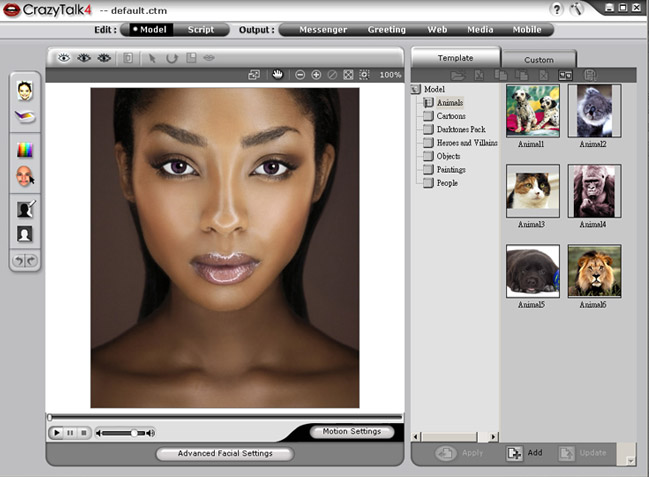
import any digital photo, image or likeness of a face from
your personal collection or from a TWAIN device such as a
scanner or digital camera. Then using a combination of innovative
real time image morphing, NaturalVoice technology and/or TTS
(Text-To-Speech) technology, bring your favorite photos to
life! During the photo-fitting process, an image is bonded
with a wireframe so it can be morphed to display several different
expressions and gestures. You can provide your own recorded
voice message, an external voice file, or use the TTS feature
to covert text to a voice message. This message combined with
your talking image provides a CrazyTalk character that you
can send to your friends and colleagues using various output
options.
Note:
You can download the text-to-speech converter from Microsoft,
or browse to Reallusion's
website for more information.
You can send your CrazyTalk characters as
an animated greeting card using the CrazyCard Creator, or
as an instant message with the CrazyTalk Messenger. You can
export your talking characters to HTML format for use on websites
or export them to media files of numerous formats. You can
even export the talking image to mobile-compatible format
and send it to your mobile phone.
Click the following links to see how to quickly
get started with using CrazyTalk and create animated talking
images.
-
Creating
a CrazyTalk Model
Create your own customized talking image using any digital
image from your personal collection or import from a TWAIN
device. Use auto fitting or advanced frame fitting tools
and image processing features to make your image realistic
and perfect.
-
Creating
a CrazyTalk Script
Create your own customized talking message using any imported
audio file, your own voice recording , or typing text.
Use the Script interface to synchronize the lip movements
of the talking image with the message, combine expressions
and gestures with the talking image, and add background
music to the talking image.
-
Sending
a CrazyMessenger
Send an instant talking message to your friends and colleagues
in the form of an executable file.
-
Sending a CrazyCard
Send a personalized electronic greeting card complete
with your own talking character, choice of card template,
text message, and additional special effects.
-
Exporting
for Web
Convert your talking image and message into HTML format
which can then be used for your web site. You can also
insert the HTML code for the image directly in your web
documents.
-
Exporting Media
Files
Convert your talking image into video files for your DVD,
SVCD, or VCD player. You can also create a media file
that you can play back on your PC, or mobile phone.
-
Export for
Mobile Devices
Convert the talking image into a format that is compatible
with different types of mobile phones.
|