Introducing the Messenger
Page
You can send your animated model image to your friends and
colleagues in the form of a messenger, which is an executable
file. The recipient can simply double-click the file icon
to view the messenger and hear the animated message. You can
select a frame of your choice that embeds the talking image
as well as specify the playback and quality settings.
After selecting an image as the model
and setting up the script,
click the Messenger
tab under Output to
create a CrazyMessenger. The Messenger page has the following
tools.
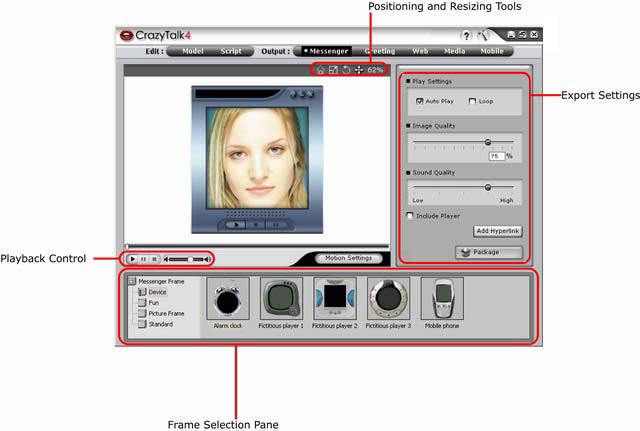
The following table provides a brief description about the
various tools used while creating a messenger.
| Positioning
and Resizing Tools |
Enables you to view, resize, rotate, or move the talking
image so that it fits properly in the messenger frame. |
| Export Settings |
Provides tools for specifying the playback settings as well
as the sound and image settings for the messenger. |
| Frame Selection Pane |
Provides a number of various interesting frames for creating
the messenger. The talking image is embedded inside
the frame. |
| Playback
Control |
Provides tools for playing, stopping, or pausing the animation
script to test the messenger. |
| Natural Motion Settings |
Enables you to configure head and shoulder movements in
standby and animation mode. |
|