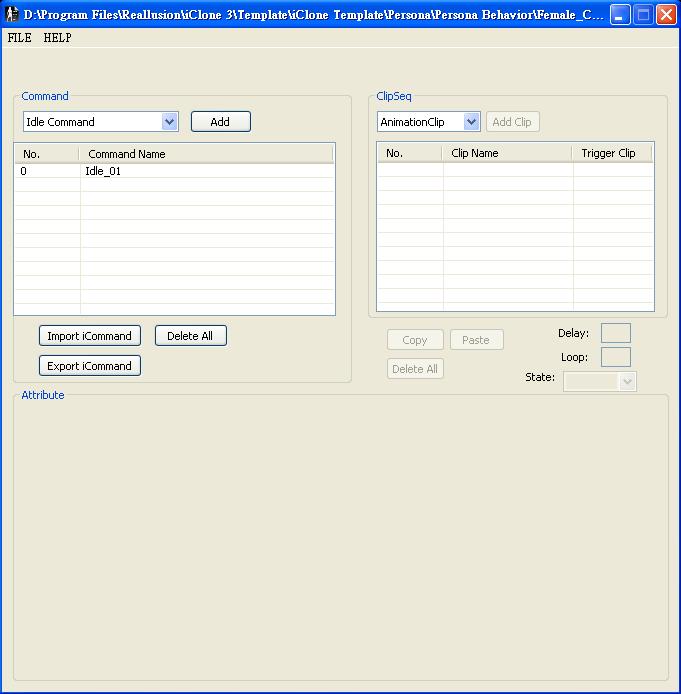



AML ScriptEditor is an official developer tool for iClone content creators to increase the user productivity with interactive content. Since iClone3 actors and iProps are preset with smart controls, AML ScriptEditor allows users to create custom iContent (which means interactive content like: Persona, iProp...) more easily.
For more information please go to http://developer.reallusion.com/amleditor.aspx.

1. Lunch AML Script Editor and open Female_Casual.aml file.
  Default Personae are located under:
  C:\Program Files\Reallusion\iClone 3\Template\iClone Template\Persona\Persona Behavior Vol.1\Female
 
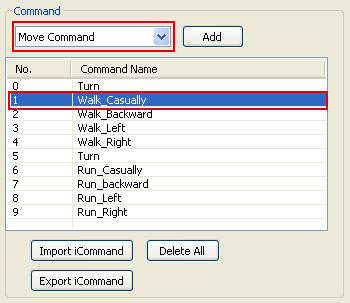
2. In Command section, select Move Command and click on Walk_Casually.
  (Double click on the selected command name to rename it. Example: Walk_Sneaky)
 
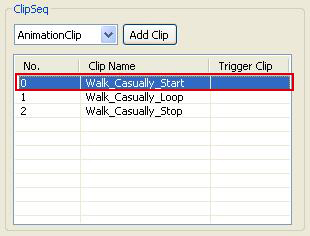
3. In ClipSep section select AnimationClip and click Walk_Casually_Start
  (Double click on the selected clip name to rename it Example: Walk_Sneaky_Start)
 
4. In Attribute section, Clip Location click Browse to set Walk_Sneaky_Start motion as the new path.
 
 
Preset character motions are located under:
C:\Program Files\Reallusion\iClone 3\Template\iClone Template\Motion\Persona Behavior Vol.1\Female\Walking
5. Select Walk_Casually_Loop and repeat step 3 and 4 to set Walk_Sneaky_Loop motion clip.
6. Select Walk_Casually_Stop and repeat step 3 and 4 to set Walk_Sneaky_Stop motion clip.
7. Save as a new persona file. Example: Female_Sneaky.aml
 
Copyright © 2009 Reallusion, Inc.