|
3D Viewer
|
| Function |
Hotkey |
Notes |
Preview |
F10 |
Press the
 button to
preview the render result. button to
preview the render result. |
| Rectify the camera angle |
B
|
Snap the camera back to the upright position. |
| Quick Light Adjusting |
/
|
Hold this key to temporarily switch to the
manipulating light mode. The first enabled light can then be adjusted by
dragging the mouse left (move) or right (rotate) button. |
| Quick camera Positioning |
A - Left
S - Right
D - Back
F - Front
G - Top
H - Bottom
J - Face
K - All
Home - 45 Degrees |
Press F to view the selected
object (character,
accessory, prop) face front.
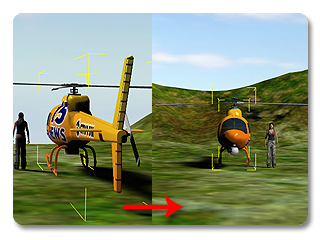
Press Home to snap the camera
to a 45 degree perspective of the selected object (character,
accessory, prop).
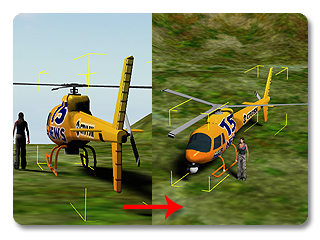
|
|
Camera Manipulation Switch
|
Z - Zoom
X - Pan
C - Rotate X - Y
V - Rotate X - Z |
|
N |
Toggle Walk Navigation Camera Mode. |
M |
Toggle Fly Navigation Camera Mode. |
ESC |
Exit the Walk/Fly Camera Mode. |
Manipulate Camera in Object Editing Mode |
Alt + Left mouse Button
|
Move Camera. |
Alt + Right Mouse Button
|
Rotate Camera. |
Alt + Both Mouse Buttons
|
Zoom Camera. |
| Duplicating Objects |
Shift + D
|
Open the Multi-Duplicate panel (a
prop or an accessory must be first selected). |
| Search Objects |
Shift + F
|
Open the Scene Manager Search panel
for searching a specific object. |
| Tips - Speed movement:
Holding the Shift key while zooming, panning, rolling and rotating will increase the movement speed by 10x. |
|
|
|
Note:
|
Action |
Hotkey |
Notes |
Transform |
Alt + Right/Left Arrow Keys
|
Move along X Axis. |
Alt + Up/Down Arrow Keys
|
Move along Y Axis. |
Ctrl + Up/Down Arrow Keys
|
Move along Z Axis. |
Ctrl + Left/Right Arrow Keys
|
Rotate by Z Axis. |
Combining Above Keys With Shift Key
|
Accelerate Movement. |
File |
Ctrl + O
|
Open Existing Project. |
Ctrl + S
|
Save Current Project. |
Ctrl + N
|
New Project. |
Selection |
Ctrl + Left Mouse Button |
Multi-Selection. |
Transform Switching |
Q
|
Toggle to Select tool. |
W
|
Toggle to Move tool. |
E
|
Toggle to Rotate tool. |
R
|
Toggle to Scale tool. |
Snap |
Ctrl + E |
Toggle Angle Snap On/Off. |
Ctrl + W |
Toggle Snap to Grid On/Off. |
Ctrl + M |
Toggle Snap to Model On/Off. |
IK Related |
Left Mouse Button
|
Move the Bone. |
Ctrl + Left Mouse Button
|
Select/Deselect IK start bone of Non-Human Character. |
FK Related |
Drag Left Mouse Button or mouse wheel
|
Offset the Bone. |
Right Mouse Button
|
Switch among Offset Axis. |
Move Tool |
Left Mouse Button
|
Move along X-Y Plane. |
Roll Mouse Wheel
|
Move along Z Axis. |
Right Mouse Button
|
Rotate by Z Axis. |
Both Mouse Buttons
|
Scale uniformly. |
Rotate Tool |
Left Mouse Button
|
Rotate by Z Axis. |
Right Mouse Button
|
Rotate by Y Axis. |
Both Mouse Button
|
Rotate by X Axis. |
Scale Tool |
Left Mouse Button
|
Scale uniformly. |
Right Mouse Button
|
Scale along Z Axis. |
Both Mouse Buttons
|
Scale along X-Y Axis. |
Copy |
Ctrl + Move/Rotate/Scale
|
Copy the Selected Object. |
Open Specific Panels |
Shift + F2
|
Open the Prop Puppet panel (a prop must be first selected). |
Shift + F3
|
Open the Edit Motion Layer panel (a standard or a non-standard character must
be first selected). |
Shift + F5
|
Open the MixMoves panel (a standard or a non-standard character must
be first selected). |
Shift + F6
|
Open the Motion Puppet panel (a standard or a non-standard character must
be first selected). |
Shift + F7
|
Open the Direct Puppet panel (a standard or a non-standard character must
be first selected). |
Shift + F8
|
Open the Device Mocap panel (a standard or a non-standard character must
be first selected). |
Shift + F9
|
Open the Physics panel (a prop or an accessory must
be first selected). |
Shift + F11
|
Open the Pivot Edit panel (a prop must
be first selected). |
Puppet Panels |
Space Bar
|
Start previewing. |
Alt + Space Bar
|
Start puppeteering and recording. |
Number Keys (1, 2, 3...)
|
Toggle between puppeteering functions with the Direct Puppet and Prop Puppet - Simple Mode panels
during Previewing or Recording. |
Q, W, E, R, T, Y
|
Toggle between the Full Face Control templates during Previewing or Recording. |