Clearing Clips

IClone provides several methods to clear multiple clips for objects.

Reset All (Edit/Director Mode)

  1. Please make sure that you really intend to remove all the motion/animation clips.
  2. Press the Reset button on the play bar.

All the motion/animation clips of All Objects will be removed.
Clear Clips of a Specific Object (Edit Mode)

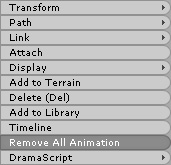
  1. Right-click on the target object whose clips you want to remove.
  2. Select Remove All Animation from the pop-up menu.

    Note:

    Please note that if you use these two methods to remove animation or motion clips, then the Link key in the first frame of the project will not be removed. You must manually delete the key in the Constraint >> Link track of timeline (Shortcut: F3).

Clear All Clips in a Single Track (Edit/Director Mode)

  1. Select an object whose specific track you want to clear.
  2. Press F3 to show the Timeline and turn on the target track.
  3. Double-click on the title of the track to select all the clips in it. Press the Delete button.

All the clips in the track will be removed.

