Introducing the Export Page
CrazyTalk Animator now offers the convenient feature of exporting your
project into multimedia formats that are compatible with a wide range
of devices. For instance, you can now convert your work to an AVI
file with DVD and HD quality.
You can also convert it into sequenced image (BMP/JPG/TGA/PNG) files to broadcast on a web server. Exporting Flash files is also
supported so you may output your projects as flash animation.
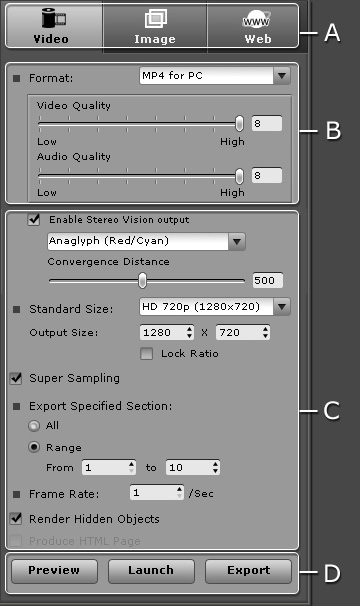
A. Media Types
|
Mode Tabs
|
-
 :
Output Video/iWidget/PopVideo/Wave Files. :
Output Video/iWidget/PopVideo/Wave Files.
-
 :
Output Sequenced Images and GIF Animation Files. :
Output Sequenced Images and GIF Animation Files.
-
 :
Output FLV or SWF Files for Web. :
Output FLV or SWF Files for Web.
|
B. Format and Quality
In this section, you may choose the image, video and audio quality output.
-
Utilize the Format drop-down list to decide the format of the exporting media.
-
Drag the Video and/or Audio sliders to set the quality of the
exporting media.
|
Note:
-
By default, the export format is WMV; however, if you want to further edit the
exported video with an external video editor, the please choose AVI RAW data for lossless post production;
this maintains color fidelity for high quality production.
-
For more information about
WidgetCast, please refer to
https://www.reallusion.com/widgetcast/help/
-
For more information about PopVideo, please refer to the
popVideo Converter Online Help.
-
If you wish to export as a Gif Animator, iWidget or popVideo with transparent
background, then please remember
to set the background in solid color.
-
If you want to export into a
WMV file format,
then you will need to first download and install the WMVEncoder9
from the Microsoft website.
|
C. General Settings
In this section you may set projects as 3D media and set other general settings.
D. Export Tools
|
Export Buttons
|
-
 :
Click this button to preview the current
frame results. :
Click this button to preview the current
frame results.
-
 :
If you have installed Reallusion WidgetCast, then this
button will be enabled. You may then click it to export your project directly into
this program. :
If you have installed Reallusion WidgetCast, then this
button will be enabled. You may then click it to export your project directly into
this program.
-
 :
Click this button to export your project in accordance
to your settings. :
Click this button to export your project in accordance
to your settings.
|