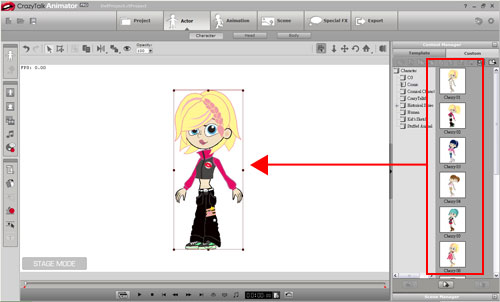
| Step1. |
Load a character into the scene |
| |
 |
| |
|
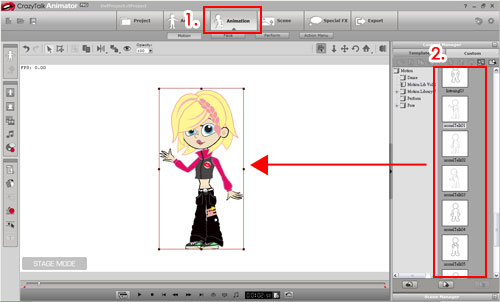
| Step2. |
Apply a motion |
| |
 |
| |
|
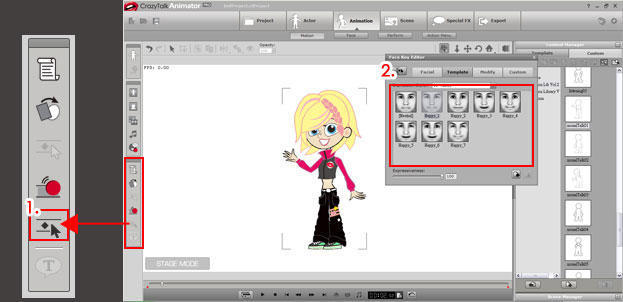
| Step3. |
Apply a facial expression |
| |
 |
| |
|
| Step4. |
Edit animation for the lips |
| |
You can use other means to generate lip animations besides editing the lips in the Timeline. |
| |
| |
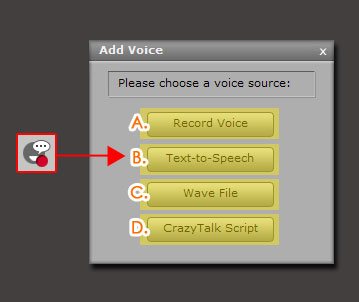 |
| A. Import Wave/MP3 Files |
| Import a .wav file and the program will generate the animation of mouth opening and closing based on the file. |
| |
| B. Text to Speech |
| Input the words that you want your characters to say, and the program will generate the animation of mouth opening and closing.. |
| |
| C. Sound Recorder |
| If you have a microphone, you can record your voice for the character, and the program will sync the character's lips after the recording is complete. |
| |
| D. Import Talking Scripts |
| If you have pre-made CTS files, you can import them directly. |
| |
| For more details, please read |
| |
|
| |
|
| Step5. |
Hit play |
| |
Look !! Doesn’t your character look a lot more lifelike ? |
| |
|
| |
|



